How to Login on 3 Card One – Complete Guide
Every time you open 3 Card One the first thing you do is log in. When it works it takes ten seconds. When something goes wrong it feels like the longest ten seconds of your day. This guide covers the full login process and every problem you might face so you are never locked out of your own account.
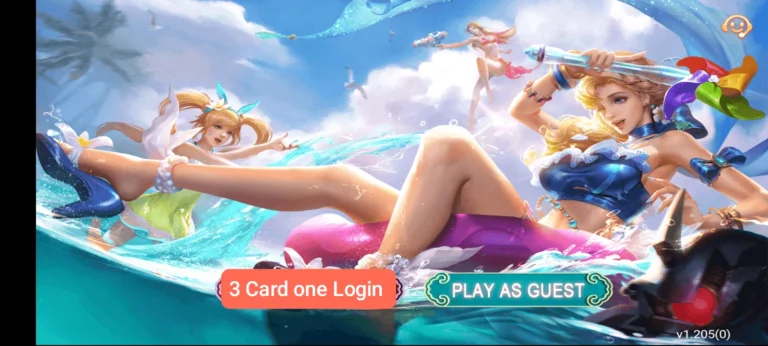
How to Login
Opening your account on 3 Card One is straightforward. Follow these steps every time you log in.
- Open the 3 Card One app on your phone.
- Tap Login on the main screen.
- Enter your registered Pakistani mobile number.
- Enter your password carefully.
- Tap Login and your dashboard opens instantly.
That is all it takes when everything is in order. The problems begin when one of those steps does not go as expected.
Forgot Your Password
Forgetting your password happens to every player at some point. The important thing is knowing exactly what to do when it happens so you get back in quickly without making the situation worse.
Do not try guessing your password repeatedly. After several wrong attempts your account gets temporarily locked for security reasons and that creates an additional problem on top of the one you already had. Instead tap Forgot Password on the login screen the moment you realise you cannot remember it.
Enter your registered mobile number and tap Send OTP. A verification code will arrive on your phone within 30 seconds. Enter it before it expires and you will be taken to a screen where you can create a new password. Choose something strong that mixes letters and numbers. Tap Submit and log in normally with your new password.
Login Problems Pakistani Players Actually Face
Wrong Password
Passwords on 3 Card One are case sensitive. A single capital letter typed in lowercase or a lowercase letter typed in capitals is enough to cause a login failure every time. Before assuming your password is wrong check that Caps Lock is off and try again. If you are certain the password is correct but it still does not work use Forgot Password to reset it rather than continuing to guess.
Wrong Mobile Number
Many players in Pakistan use two SIMs and regularly enter the wrong number on the login screen without realising. The app shows an error and the player assumes their account has a problem when the actual issue is simply the wrong number. Go back and read every digit of your registered number carefully before trying again.
Verification Code Not Arriving
If you requested a code to reset your password and it never came check two things immediately. First make sure your mobile signal is strong — a weak signal delays or completely blocks incoming SMS messages. Second check that your inbox is not full. A full inbox cannot receive new messages including verification codes. Wait at least 30 seconds before tapping Resend and never tap it multiple times quickly because that triggers a temporary block on further requests from your number.
App Freezing on the Login Screen
This is one of the most frustrating problems and it happens most often on older Android phones with limited memory. When too many apps are running in the background the phone does not have enough free memory to load 3 Card One properly and the login screen freezes. Close every app running in the background first and then open 3 Card One again. If it still freezes go to your phone Settings, find 3 Card One in the app list, and tap Clear Cache. Restart your phone after clearing the cache and try logging in again. If none of this works download the latest version of the app from the official website, uninstall the current version, and install the fresh one.
Account Suspended
If you see a suspended or blocked message when you try to log in do not keep attempting to enter your account. Repeated login attempts after a suspension can make the situation worse and delay the resolution. Contact 3 Card One support immediately through the official channel inside the app. Explain your situation honestly, provide your registered mobile number, and wait for the support team to review your case. Most suspensions caused by misunderstandings are resolved quickly once support looks into the account.
App Version Too Old
An outdated version of 3 Card One eventually becomes incompatible with the current server and login errors start appearing without any obvious reason. If your app has not been updated in a while this is likely the cause. Visit the official 3 Card One website, download the latest APK, uninstall the version currently on your phone, and install the updated one. Log in normally after installation.
Keeping Your Account Secure After Login
Logging in successfully is only part of the responsibility. What you do after logging in matters just as much for keeping your account safe.
Never share your password with anyone. Not with friends, not with family, and especially not with anyone who contacts you claiming to be from 3 Card One support. Real support from any legitimate platform will never ask for your password under any circumstances. If someone asks for it that is a scam regardless of who they claim to be.
If you use a shared phone always log out of 3 Card One after every session. Your account stays active until you manually log out or your session expires. Another person using the same phone can access your account and your balance if you leave yourself logged in.
Change your password immediately if you ever notice something unusual — balance changes you did not make, games played that you did not play, or login notifications from a time when you were not using the app. These are signs that someone else has accessed your account and the faster you change your password the better.
Final Thoughts
Logging into 3 Card One should be the easiest part of your day. When it is not the answers are almost always in this guide. Keep your password strong and private, use the Forgot Password option instead of guessing repeatedly, log out on shared devices, and update the app whenever a new version is available. Do these things consistently and your 3 Card One account will stay accessible and secure every single day.